Interface Module
Qt6/PySide6-based graphical user interface for drone control, computer vision, and ROS2 system tools.
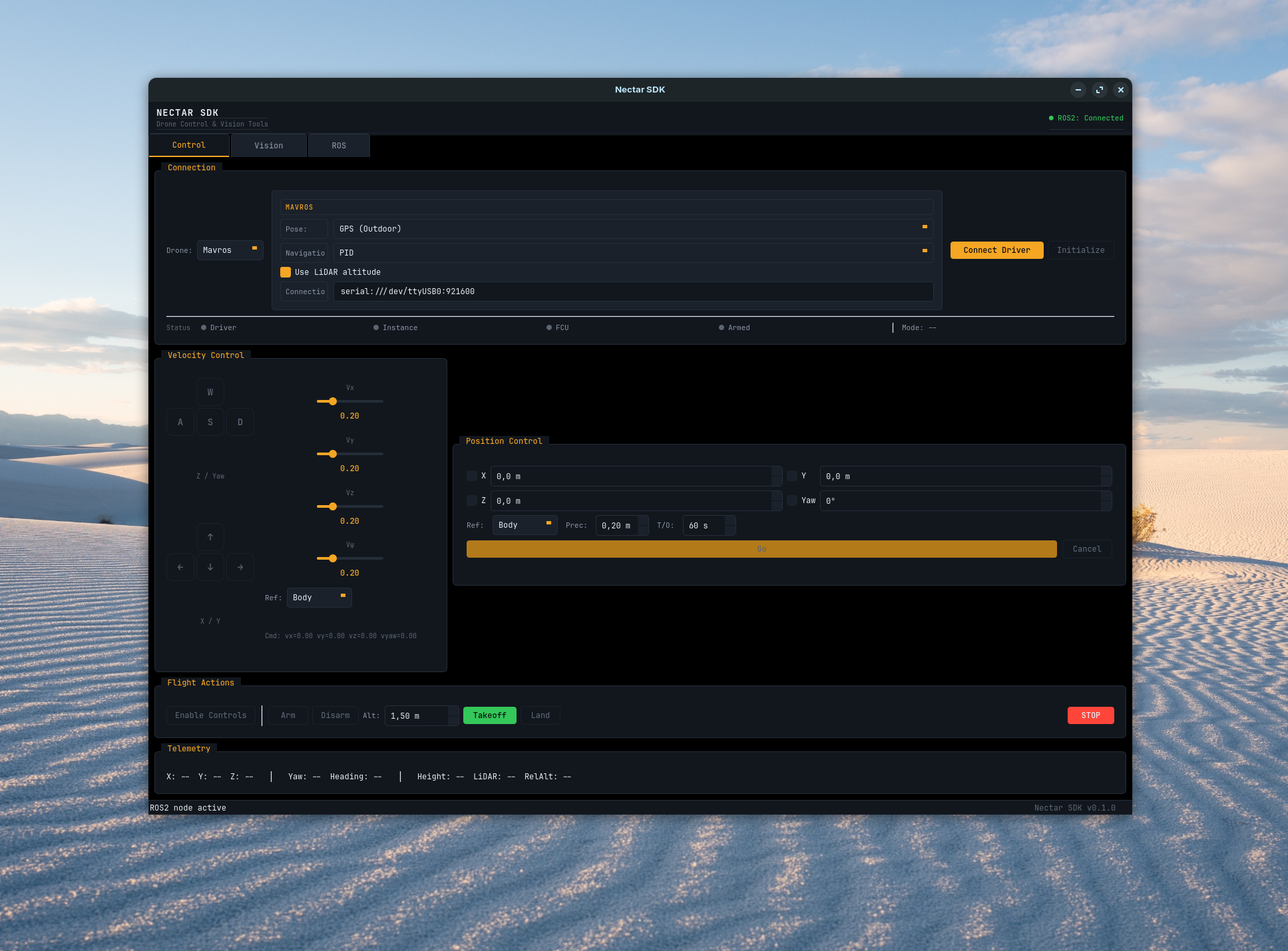
Nectar SDK GUI - Control, Vision, and ROS2 tools in one interface
Quick Start
Or from command line:
Features
Control Tab
Drone control interface with keyboard-based velocity control and position navigation.
Connection Flow:
- Select Firmware + Link: Pick the firmware (ArduPilot, PX4, Bebop, Crazyflie) and, for ArduPilot/PX4, the transport (MAVROS, MAVLink, or DDS). The config panel adapts to the selection.
- Connect Driver: Starts the background driver process — MAVROS (
apm.launch/px4.launch), the Crazyflie server, the Bebop driver, orMicroXRCEAgentfor PX4 DDS. Direct-MAVLink links (ArduPilot/PX4) open the FCU link inside the instance, so this step is skipped. - Initialize Instance: Creates the drone object with the configuration selected in the panel.
- Ready: Flight controls enabled.
Status Indicators:
- Driver: ROS2 driver / agent process running
- Instance: Drone object initialized
- FCU: Flight controller connected (FCU vehicles)
- Armed: Motors armed state (FCU vehicles / Crazyflie)
Velocity Control:
- Keyboard: W/S (up/down), A/D (yaw), Arrow keys (forward/back/left/right)
- Sliders: Adjust max velocity per axis (Vx, Vy, Vz, Vyaw)
- Reference Frame: Body, World, or Takeoff
Position Control (FCU vehicles and Crazyflie):
- Navigate to target position with X, Y, Z, Yaw offsets
- Reference frames: Body or Takeoff
- Configurable precision and timeout
Backends (Firmware + Link):
| Firmware / Link | Key | Notes |
|---|---|---|
| ArduPilot / MAVROS | mavros |
Full ArduPilot control (arm, takeoff, land, velocity, position, telemetry) over the MAVROS bridge |
| ArduPilot / MAVLink | mavlink |
Same control over a direct pymavlink link (no MAVROS); set the connection string and, for indoor flight, the vision-pose topic preset (/visual_slam/tracking/vo_pose_covariance) |
| PX4 / MAVROS | px4 |
OFFBOARD setpoint streaming; connection defaults to the PX4 offboard endpoint (udp://:14540@127.0.0.1:14580 for SITL) |
| PX4 / MAVLink | px4_mavlink |
Direct pymavlink link (no MAVROS); defaults to udp:0.0.0.0:14540 |
| PX4 / DDS | px4_dds |
Native uXRCE-DDS. Connect Driver launches MicroXRCEAgent on the configured UDP port (default 8888); an agent started elsewhere (e.g. make sim-bridge FIRMWARE=px4 PROTOCOL=dds) is detected automatically. Readiness is the appearance of PX4's /fmu/* topics, not a process or session name |
| Bebop | bebop |
Basic control (takeoff, land, velocity, flips) |
| Crazyflie | crazyflie |
Takeoff, land, velocity, and onboard position (goTo) |
The MAVROS and MAVLink panels are shared by ArduPilot and PX4 and adapt to the firmware: the connection default switches to the PX4 offboard endpoint, and the PID and setpoint preset lists are loaded from the PX4 config instead of the ArduPilot config (both include the *_sim_* SITL presets). The setpoint config exposes each firmware's speed/accel limits — ArduPilot WPNAV/GUID_OPTIONS or PX4 MPC_* — with Apply setpoint params to FCU pushing them on arm. The uXRCE-DDS panel (px4_dds) exposes pose source, agent UDP port (default 8888), namespace, and the PID preset — but no setpoint/apply-setpoint controls, since PX4 parameters are not bridged over uXRCE-DDS.
Vision Tab
Real-time computer vision processing with multiple camera sources and filters.
Camera Sources: Webcam, RealSense, T265, OAK-D, C920, IMX219, ROS topic, ROS depth, File
Filter Categories:
- Color: HSV color filtering with calibration
- Edge: Canny edge detection, contours
- Blur/Transform: Gaussian blur, sharpen, rotate, resize
- Morphology: Erode, dilate, adaptive threshold, histogram equalization
- Effects: Pencil sketch, stylization, cartoonify, Hough lines/circles, optical flow
- AI: Hand tracking (MediaPipe), face mesh (MediaPipe)
- Markers: ArUco detection (17 dictionary types)
Depth Estimation (depth cameras):
- Real-time distance measurement
- Colorized depth visualization
- Click-to-measure distance
ROS Tab
ROS2 system introspection and interaction tools.
Topics:
- Browse, subscribe, and publish messages
- Real-time message viewing
- Auto-detect QoS settings
Services:
- Browse and call services
- Custom request/response handling
Parameters:
- View and modify node parameters
- Real-time updates
Plot:
- Real-time plotting of numeric fields
- Multiple plots, pause/resume
- Export to CSV
Architecture
High-Level Structure
classDiagram
    class NectarApp {
        QMainWindow root
        owns tabs + ROSExecutor
    }

    class ROSExecutor {
        +node Node
        +start(node_name) bool
        +shutdown()
    }

    class ControlTab {
        +set_node(node)
        +cleanup()
    }

    class VisionTab {
        +set_node(node)
        +cleanup()
    }

    class ROSTab {
        +set_node(node)
        +cleanup()
    }

    NectarApp *-- ROSExecutor
    NectarApp *-- ControlTab
    NectarApp *-- VisionTab
    NectarApp *-- ROSTab
Thread Model
flowchart TB
    subgraph MainThread["Main Thread (Qt Event Loop)"]
        UI[UI Updates]
        Timers[QTimers]
    end

    subgraph ROSThread["ROS2 Thread"]
        Executor[MultiThreadedExecutor]
        Callbacks[ROS Callbacks]
    end

    subgraph WorkerThreads["Worker Threads"]
        Workers[DriverWorker, MoveToWorker, etc.]
    end

    UI --> |"Start"| WorkerThreads
    WorkerThreads --> |"Signals"| UI
    ROSThread --> |"Signals"| UI
Key Points:
- ROS2 executor runs in separate thread
- Blocking operations (driver start, navigation) use worker threads
- Velocity commands sent via QTimer (50ms interval)
- All UI updates happen in main thread
For Developers
Widgets
Reusable UI components available in nectar.interface.widgets:
| Widget | Purpose |
|---|---|
Card |
Elevated container with rounded corners |
StatusIndicator |
Status dot with label (active/inactive/warning/error) |
LabeledSlider |
Vertical slider with label and value display |
CollapsibleSection |
Expandable/collapsible section |
VideoDisplay |
OpenCV frame display with click support |
ImageViewer |
Video display with info label |
DualVideoDisplay |
RGB and depth display |
DroneConfigPanel |
Drone configuration UI |
DetectionConfigPanel |
Object detection model configuration |
MessageFieldEditor |
ROS message field editor |
ParameterReconfigureWidget |
ROS2 parameter editor |
Example:
from nectar.interface import Card, StatusIndicator, LabeledSlider

card = Card()
card.add_widget(StatusIndicator("Status", "active"))
card.add_widget(LabeledSlider("Speed", 0.0, 1.0, 0.5))
ROSExecutor
Manages ROS2 node and executor in background thread:
from nectar.interface import ROSExecutor

executor = ROSExecutor()
executor.start("my_node")
node = executor.node  # Access ROS2 node
executor.shutdown()
Signals:
status_changed(bool): ROS2 connection statuserror_occurred(str): ROS2 errors
Worker Threads
Long-running operations use QThread workers to avoid UI freezes:
- DriverWorker: Start/stop ROS2 driver processes
- DroneInstanceWorker: Initialize drone objects
- MoveToWorker: Position navigation (blocking PID loop)
- FlightActionWorker: Service calls (arm, takeoff, land)
- CameraInitWorker: Camera initialization
Pattern:
worker = MyWorker()
worker_thread = QThread()
worker.moveToThread(worker_thread)
worker.finished.connect(worker_thread.quit)
worker_thread.started.connect(worker.run)
worker_thread.start()
Service Calls
ROS 2 service calls use an async pattern to avoid deadlocks. BaseDrone._call_service issues call_async, then blocks the calling thread on a threading.Event set by the future's done-callback — the shared executor (the SDK's background spin thread or the GUI's ROSExecutor) drives the future to completion on its own thread:
future = client.call_async(request)
done = threading.Event()
future.add_done_callback(lambda _f: done.set())
done.wait(timeout=...)        # calling thread blocks; the executor thread completes the future
result = future.result()
Blocking flight calls (takeoff, move_to, …) poll their own completion with _wait_until(predicate, timeout) (a time.sleep(0.05) loop), relying on that same background executor to keep delivering telemetry callbacks.
Layout
app.py—NectarAppmain window;ros_executor.py— ROS 2/Qt integration;theme.py— styling and colorstabs/—control_tab.py(drone control),vision_tab.py(camera and filters),ros_tab.py(ROS 2 tools)widgets/— reusable components:drone_config.py,detection_panel.py,message_editor.py,param_reconfigure.py
Theming
Colors defined in theme.py:
from nectar.interface import COLORS

COLORS.background      # #0A0E14
COLORS.surface         # #12171E
COLORS.accent          # #F5A623 (amber)
COLORS.success         # #34C759 (green)
COLORS.error           # #FF453A (red)
# ... see theme.py for full list
Troubleshooting
UI Freezes: Ensure blocking operations use worker threads (not main thread)
Service Timeouts: Check driver is running and FCU is connected
No Telemetry: Verify driver connection and sensor configuration matches FCU setup
Camera Not Working: Check device permissions and ROS topic names